Control the shot. Automate the rest.
Plan scenes or build node pipelines, chain shots by their last frames, fill Flow’s start and end frame slots, and run it all with budgets and recovery, so you spend your time on choices and your credits on keepers.
Flowvdo uses your own Google Flow account and credits, and your own AI provider key. Not affiliated with Google.
Sound familiar?
I lose an afternoon pulling last frames and re-uploading them as start frames.
My pipeline lives in my head, so I can’t repeat it exactly.
A failed overnight queue means I don’t know what was generated and what wasn’t.
I want my files named and checksummed so my edit never points at the wrong take.
Built for control
Start and end frames
Fill Google Flow's Start and End frame slots from chained scenes and workflow nodes.
Last-frame chaining
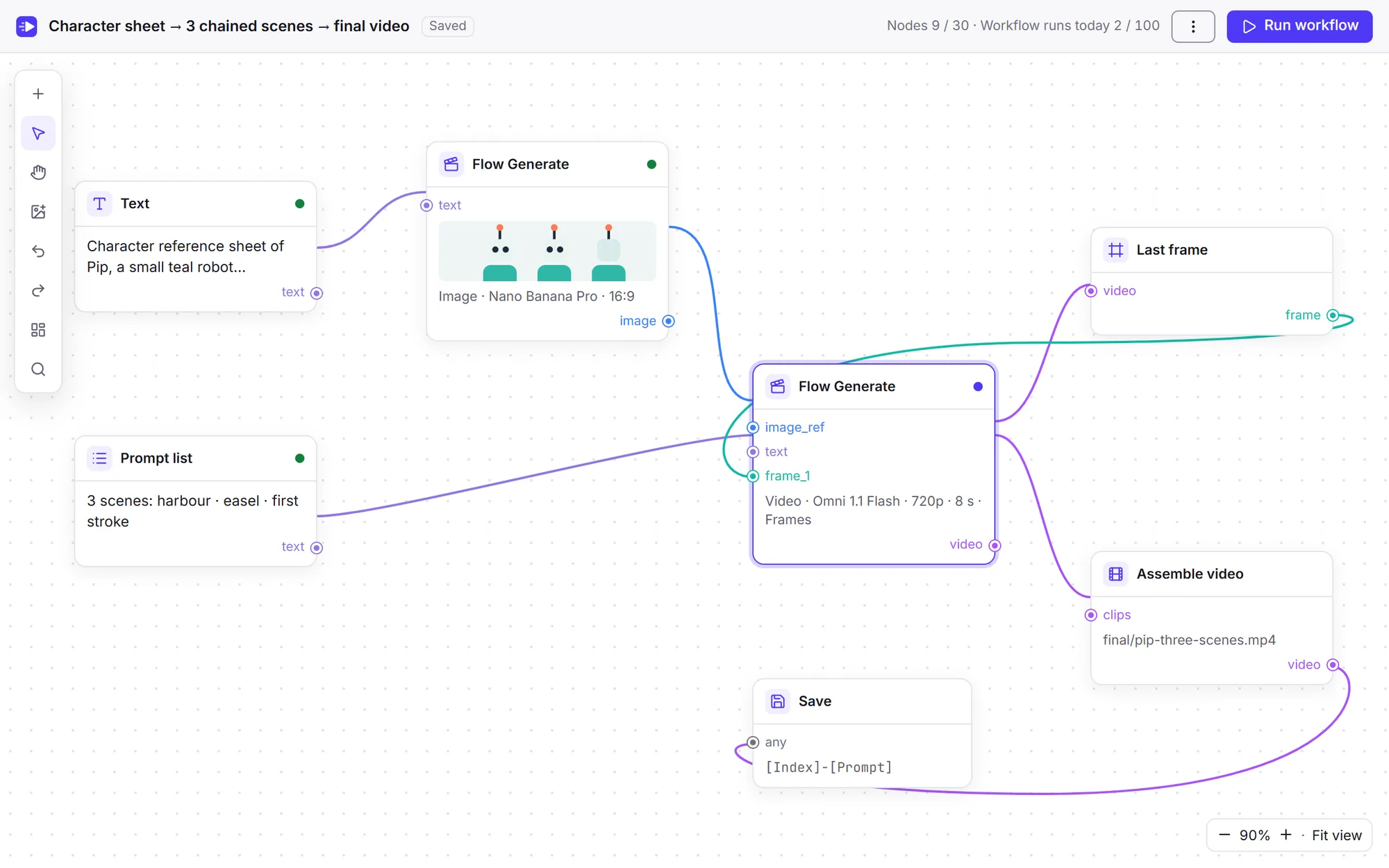
A scene can start from, or reference, the last frame of the scene before it.
Workflow Editor
A node editor in its own window and on the web, with undo, auto-arrange, capture and JSON import/export.
Same safe engine
Workflows run with the same budgets, pauses and recovery as stories and batches.
Every prompt editable
Edit each scene’s exact Google Flow prompt, camera and duration before you run.
Checked files and manifest
Every file is checked, given a SHA-256 checksum and listed in manifest.json.
Checked settings and cost
Settings are read back after they are set, and the credit cost Flow shows is read before every generation.
Retry and skip
Retry or skip one step, retry all failed, or act on many at once.
Manual submit
Flowvdo fills in the prompt, settings and references; you check them and press Generate.
Your pipeline, as a file
A workflow is a graph you can export as JSON, import elsewhere, capture as an image for your notes, and run again with different inputs. The “Character sheet → 3 chained scenes → final video” template is a good place to start.
See the templatesFrames, chaining and workflows is in every plan. The Free plan gives you 1 active project, 2 runs a month, up to 4 scenes and 30 s per video; Creator and Storyteller raise those limits. Your Google Flow credits stay your own on every plan.
Compare plansQuestions, answered
Can I upload my own start and end frames?
Which models can I use?
Can I review each shot before the next one?
Make your first story video
The Free plan makes one short video from start to finish, so you can see the whole pipeline before you pay.
Flowvdo uses your own Google Flow account and credits, and your own AI provider key. Not affiliated with Google.